Creator Tool Lab
A real prompt-to-image run, tool checks with disclosed limits, and calculations you can reproduce.
Published October 24, 2026 · Updated November 10, 2026 · TrendPromptLab Editorial / ALL IN ONE
We ran a prompt assembled by our product photo builder through ChatGPT’s image-generation tool on October 24, 2026. We also captured the actual output of ten text builders and checked three planning calculations. The briefs and financial assumptions are fictional; the rendered image and captured builder outputs are real artifacts from these runs. This is a bounded demonstration, not a cross-model benchmark or evidence of customer results.
1. From product brief to a generated image
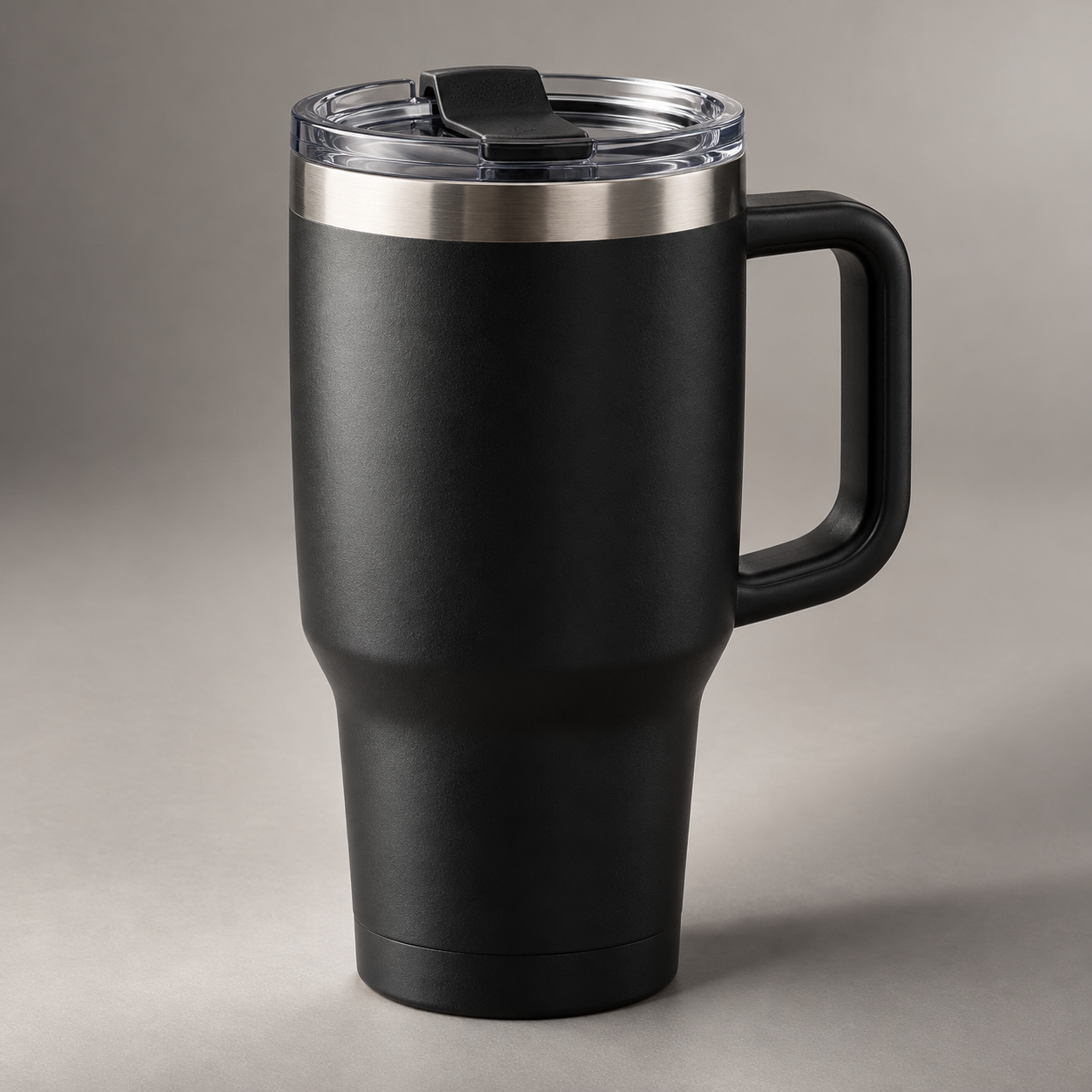
The inputs were a matte black insulated travel mug, clean commercial style, warm-gray studio, softbox with rim light, three-quarter angle, and square ecommerce composition. No reference photograph was supplied. We used the exact builder output below without adding a product specification.
Exact prompt sent to the image-generation tool
Create an original clean commercial product photograph of a matte black insulated travel mug, styled in a seamless warm-gray studio. Use large softbox lighting with a controlled rim light and a three-quarter hero angle at product height. Compose for square ecommerce listing with generous negative space. Accurate materials, realistic reflections and shadows, clean edges, believable scale, commercially polished color, no people unless requested, no extra objects competing with the product, no distorted packaging, no invented logos, no watermark, no readable text. Keep the product as the unmistakable focal point.
Our inspection of this output
| Requested | Observed | Decision |
|---|---|---|
| Matte black mug | Dark textured body with a black handle | Color and surface direction are visible; handle design was invented. |
| Warm-gray studio | Plain gray-beige surface and backdrop with a cast shadow | Suitable concept backdrop; not proof of a physical studio shoot. |
| One product as focal point | One mug fills most of the square frame; no extra props or visible writing | Readable silhouette, but less negative space than requested. |
| No reference SKU | A clear lid, silver rim and black tab were added | Reject as a real sales photograph unless these details match actual stock. |
The practical correction
For concept art, this may be usable after visual review. For an existing product listing, supply an authorized reference photograph and enumerate the lid, handle, rim and dimensions that must stay unchanged. Compare the output with the item that will ship. A polished result can still be the wrong product.
A possible next prompt addition is: “Use the supplied reference as the product specification. Preserve its exact handle, lid, rim, proportions and surface finish. Change only the studio background and light.” That revision is a proposed next test; it was not run here.
Load the same inputs in the product photo builder →
From the generated concept to a finished thumbnail
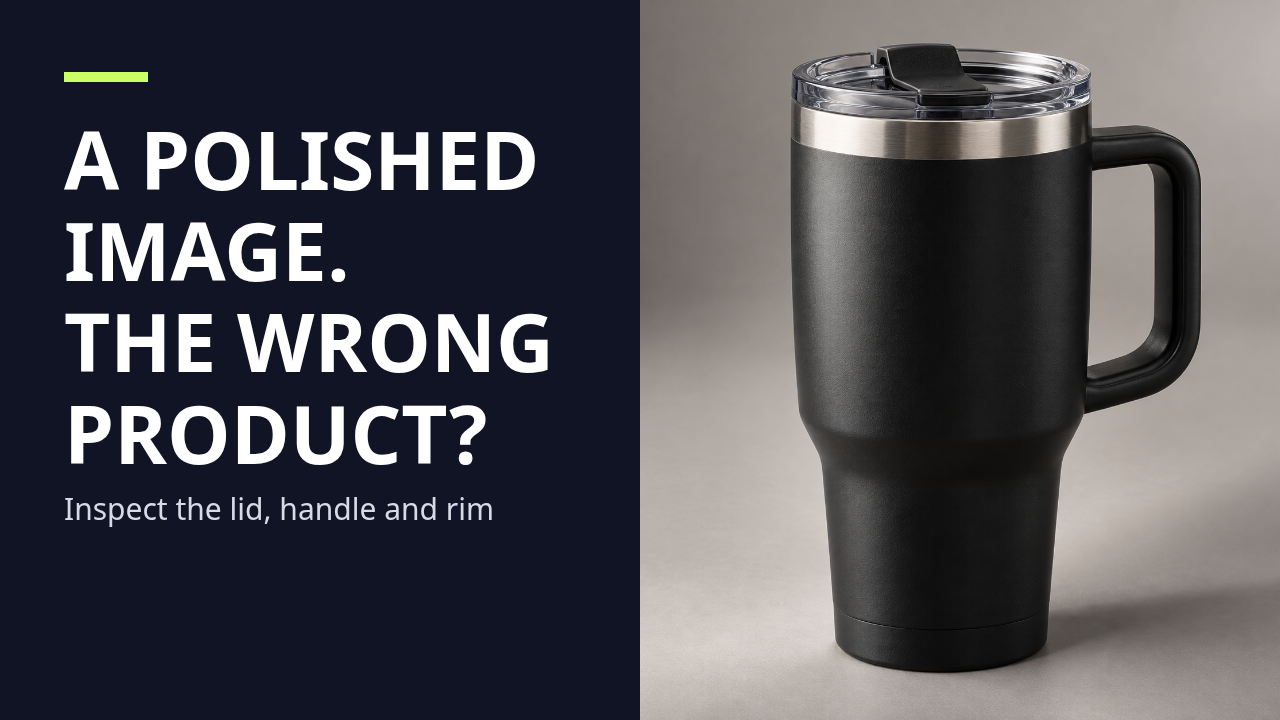
We loaded the same mug into our local thumbnail studio, added the headline “A POLISHED IMAGE. THE WRONG PRODUCT?” and exported the PNG below at 1280 × 720. The headline describes the documented inspection, rather than inventing a performance result. The editor’s planning guides are absent from this actual downloaded file.
Create and download your own thumbnail →
Measured layout case: what a square photograph loses in a split thumbnail
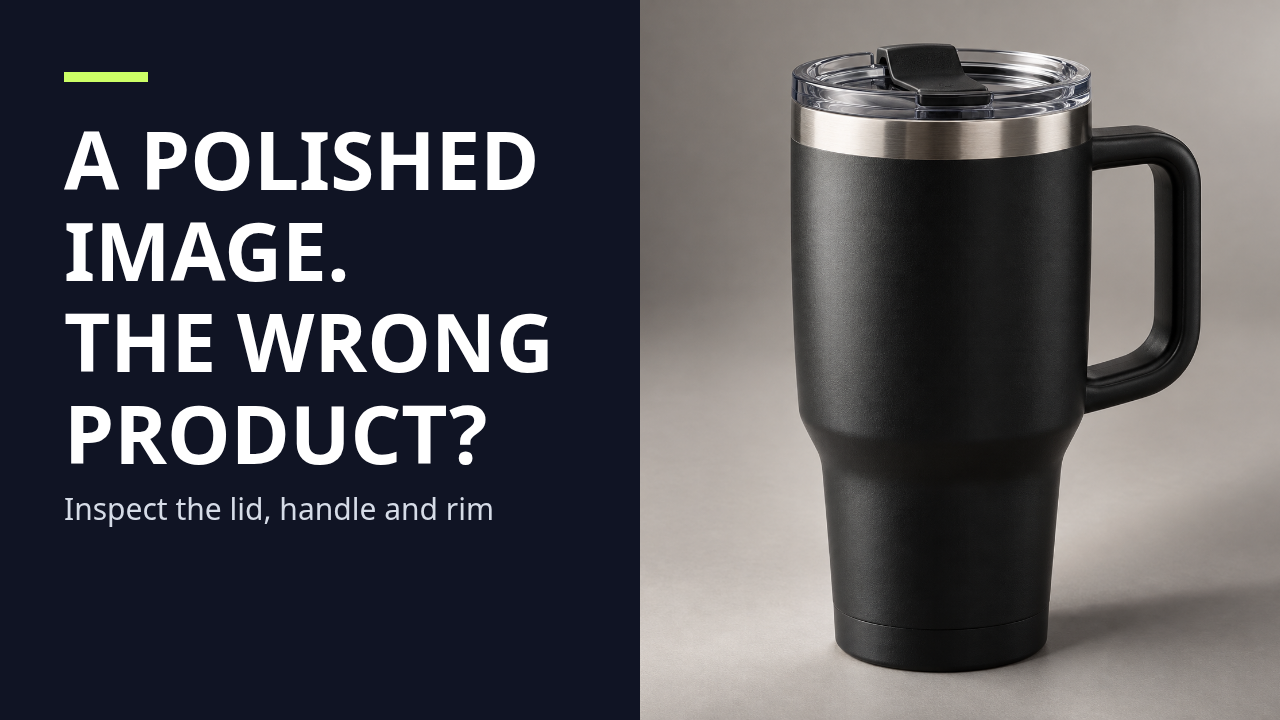
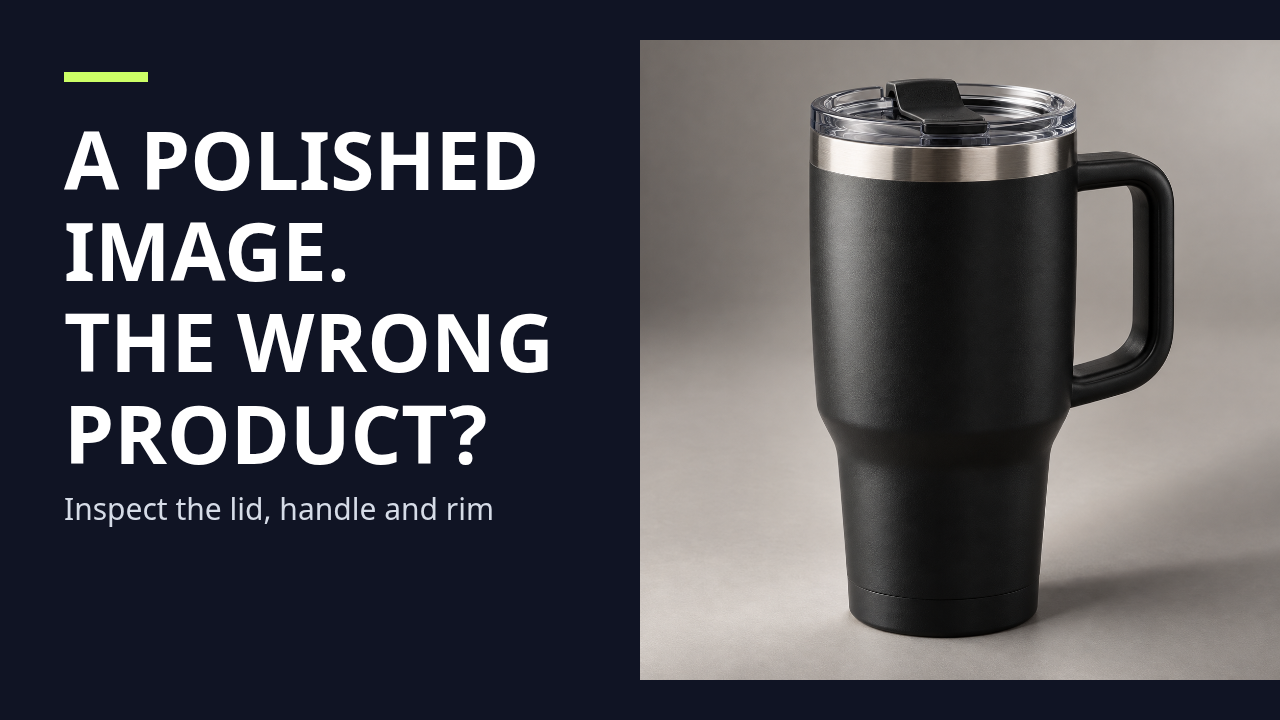
Question: Can the whole source photograph fit into the right half of a 1280 × 720 thumbnail without changing the image? On October 24, 2026, we loaded our existing 1254 × 1254 synthetic mug image into the browser editor and exported two PNGs. We kept the headline, subline, colors, photo side and centered position fixed. Only the framing mode changed. These are actual browser exports, not simulated screenshots or a new image-model run.
| Held constant | Fill photo area | Fit full photo |
|---|---|---|
| Source and photo panel | 1254 × 1254; 640 × 720 | Same source and panel |
| Rendered photograph | 720 × 720 | 640 × 640 |
| Clipping at centered position | 40 rendered pixels at each horizontal edge; about 69.7 source pixels per edge | None |
| Source area retained | 88.9% | 100.0% |
| Photo-panel area occupied | 100.0% | 88.9% |
How to reproduce the numbers
For fill mode, scale = max(640 ÷ 1254, 720 ÷ 1254), so the source becomes 720 × 720. The 640-pixel panel removes 80 rendered pixels of width. A centered position splits that loss into 40 pixels at each edge. Source-area retention is (640 ÷ 720) × (720 ÷ 720) = 88.888…%. For full-photo mode, scale = min(640 ÷ 1254, 720 ÷ 1254), giving a 640 × 640 photograph and 80 pixels of unused panel height.
Our editorial decision
The mug silhouette, lid, rim and handle remain visible in both of these centered exports; the fill version removes background at the horizontal edges. Therefore 11.1% source-area loss does not mean 11.1% of the product was removed. A large retention percentage also cannot certify that a small label or accessory survived. Use the full-photo version when the entire source matters. Use the position sliders when a cropped version needs to protect an off-center detail, then inspect the actual subject and the 320-pixel preview.
The two files demonstrate a geometric tradeoff, not which thumbnail viewers prefer. We did not measure clicks, readability with participants or audience retention. Browser fonts and image resampling can vary; the case files preserve the actual exports from this run.
Download exact settings and arithmetic (.txt) · Download the synthetic source image · Reproduce the crop in the editor →
2. Pricing: the denominator matters
Use 20 build hours × $40/hour + $100 fixed cost = $900 build cost. Add $50 of overhead and divide by 50 target sales: $19 to recover per sale. With a 10% fee and 20% reserve, only 70% of price remains for recovery and target profit.
Break-even = 19 / (1 − 0.10 − 0.20) = $27.14 (display rounded)
With $20 target profit per sale = (19 + 20) / 0.70 = $55.71
At 25 target sales: recovery = 950 / 25 = $38; break-even = $54.29
At 50% fees + 50% reserve: no finite break-even price.
We corrected the calculator so a combined 100% deduction produces a clear invalid-input message instead of an arbitrary price. Fractional target sales and empty numbers are also rejected. Currency formatting now shows cents where relevant. The reserve is a planning input, not a tax-rate recommendation.
Reproduce the pricing calculation →
3. Revenue: a positive gross can still leave almost nothing
With 5,000 visitors, a 3% subscriber rate and a 2% purchase rate, the scenario has 150 subscribers and 3 purchases. At $19, gross is $57. A 5% refund assumption removes $2.85. A 5% + $0.50 payment fee on each original sale costs $4.35. After $50 overhead, contribution is −$0.20. The break-even count is 4 sales because each sale contributes $16.60 before overhead.
This model assumes processing fees are charged on original purchases and not returned with refunds. Fractional purchases in smaller scenarios are expected values, not actual partial orders. It excludes labor, taxes and chargebacks. Copy and download now recalculate from the latest inputs, so changing a field does not export old results.
Reproduce the revenue scenario →
4. Subscriptions: find overlap before forecasting income
Enter illustrative monthly assistant costs of $20 and $20, a $15 design tool and a $50 budget. The total is $55/month or $660/year, $5 over budget. The assistant category is flagged twice. These are example inputs, not current provider prices; they do not establish that either subscription is unnecessary. Compare the actual task and cancellation terms first.
5. Inspect all ten text-builder outputs
Each linked page exposes the complete input settings, captured output, a button to load the example and a task-specific editorial critique. These are rule-based drafts. No output is claimed to improve rankings, views, sales or image quality without a separate measured test.
- AI Photo Prompt Builder
- AI Product Photo Prompt Generator
- AI YouTube Thumbnail Prompt Generator
- AI Short Video Prompt Generator
- AI UGC Ad Script Generator
- AI Product Description Generator
- AI Ad Hook Generator
- YouTube Title Generator
- YouTube Shorts Script Generator
- 30 Day Content Plan Generator
6. Input-variation audit: 211 cases across ten tools
We ran each of the ten text builders with available alternative selections, blank inputs, and multilingual or special-character text. Across 211 input combinations, the current source produced an output without a runtime failure, an empty result, or the literal word “undefined.” The combinations covered input handling; they were not 211 independent users or a quality score.
| Audit item | What we checked | What it cannot show |
|---|---|---|
| Scope | Ten text builders; alternate select values, empty fields, multilingual and special-character entries | How often real visitors use these inputs |
| Result | 211 combinations; no runtime failure, missing output or “undefined” result recorded | Whether every draft is accurate, useful or persuasive |
| Human review | Separate page examples include full settings, captured output and task-specific critique | Whether a viewer prefers the wording or achieves a business outcome |
Two defects found and corrected
- Spoken-word estimate: production labels such as “SAY:” were included in a Shorts script's spoken-word count. The counter now excludes those labels and uses the speech calculator's word-count rule.
- Copy feedback: one prompt page could report a successful copy after both clipboard paths failed. It now surfaces the failure and leaves the text available for manual selection.
These checks test software behavior and visible error reporting. They do not judge every generated line, test an external image model, establish user engagement, or predict an advertising review.
What this review does not establish
One image is not an image-model evaluation. Arithmetic checks do not validate the visitor or sales assumptions. Input-variation checks do not prove semantic quality or audience value. A working template does not replace filming, editing, source checking or audience research. We report the inputs, environment, observations and limits of each test.